



文章最后更新时间:
效果展示
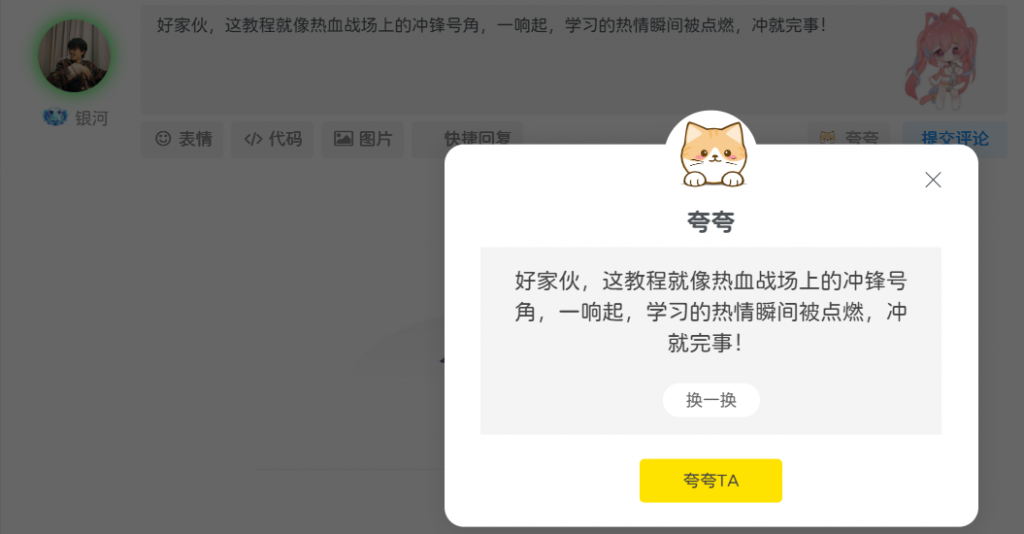
在本站评论旁边,点击 “夸夸” 按钮,就会弹出一个随机一言评论窗口。窗口里的内容俏皮又有趣,能瞬间为评论互动增添别样氛围。
操作教程
别担心,整个操作过程并不复杂,只要按照下面的步骤来,小白也能轻松搞定。
1.添加 CSS 代码:在子比主题设置中找到 “自定义 CSS 样式”,把以下代码粘贴进去:
.kuakua-first-box{
    margin: auto;
    width: 440px;
    border-radius: 16px;
    bottom: auto;
    min-height: 10rem;
    left: 50%;
    position: fixed;
    right: auto;
    top: 50%;
    transform: translate(-50%, -50%);
    background: #fff;
    z-index: 1032;
    box-shadow: 0px 0px 20px #0000001f;
    display: none;
}
@media screen and (max-width: 500px){.kuakua-first-box{width:94%;}}
.kuakua-ei{
    border-radius: 4px;
    overflow: inherit;
}
.kuakua-close{
    z-index: 9999;
    right: 14px!important;
    display: flex;
    position: absolute;
    right: 8px;
    top: 4px;
    padding: 16px;
    cursor: pointer;
}
.kuakua-column{
    position: absolute;
    width: 298px;
    height: auto;
    top: -28px;
    left: 0px;
    right: 0px;
    z-index: 6000;
    background: url(/sucai/kua-ribbon.png) 0% 0% / 298px 83px no-repeat;
    margin: 0 auto;
    text-align: center;
}
.kuakua-headerIcon{
    border-radius: 50%;
    position: relative;
    text-align: center;
    padding: 6px;
    background-color: rgb(255, 255, 255);
    width: 78px;
    height: 78px;
    margin: 0 auto;
}
.kuakua-icon{
    width: 60px!important;
    height: 60px!important;
    fill: currentcolor;
    transition: transform 0.3s ease 0s;
    cursor: pointer;
}
.kuakua-headerTitle{
    font-size: 20px;
    font-weight: 600;
}
.kuakua-modal-body{
    position: relative;
    background-color: transparent;
    text-align: center;
    border-bottom: none;
    border-top: none;
    border-radius: 0px;
    box-shadow: none;
    padding: 65px 30px 20px 30px;
}
.kuakua-contentBox{
    width: 100%;
    min-height: 102px;
    padding: 15px 20px;
    margin-top: 20px;
    border-radius: 0;
    box-sizing: border-box;
    position: relative;
    background-color: rgb(244, 244, 244);
    text-align: center;
    border-bottom: none;
    border-top: none;
    box-shadow: none;
}
.kuakua-comment{
    margin-bottom: 10px;
    line-height: 26px;
    display: flex;
    -webkit-box-align: center;
    align-items: center;
    -webkit-box-pack: center;
    justify-content: center;
    word-break: break-all;
    transition: all 0s ease 0s;
    color: rgb(68, 68, 68);
    font-size: 18px;
}
.kuakua-cancelBtn{
    background-color: rgb(255, 255, 255);
    color: rgb(102, 102, 102);
    border: none;
    border-radius: 36px;
    transition: all 0.3s ease 0s;
    padding: 4px;
    width: 80px;
    display: inline-block;
    margin-top: 10px;
}
.kuakua-confirmBtn{
    background: rgb(255, 227, 0);
    width: 118px;
    height: 36px;
    display: inline-block;
    -webkit-box-align: center;
    align-items: center;
    -webkit-box-pack: center;
    justify-content: center;
    background-color: rgb(255, 227, 0);
    color: rgb(68, 68, 68);
    border: none;
    border-radius: 4px;
    font-size: 14px;
    cursor: pointer;
    transition: all 0.3s ease 0s;
    box-sizing: border-box;
    margin-top: 20px;
}
.form-control:focus {
    border: 1px solid rgb(148 148 148)!important;
    box-shadow: none!important;
}2.添加主要代码:把下面这段代码放到子比主题的或中,推荐放。func.phpfunctions.phpfunc.php
//夸夸功能
function kuakua(){
   echo'<link rel="stylesheet" type="text/css" href="这里放CSS文件路径">
   <a class="but btn-input-expand input-image mr6" id="kuakua" href="javascript:;">
     <svg class="icon" aria-hidden="true" xmlns="http://www.w3.org/2000/svg" role="img">
  <image href="这里放图标" width="14px" height="14px" />
</svg>
<span class="hide-sm">夸夸</span>
   </a>
   <div class="kuakua-div" style="width: 9999px;height: 99999px;background: #000;z-index: 1031;position: fixed;top: 0;left: 0;opacity:.6;display:none"></div>
   <div class="kuakua-first-box">
           <div class="kuakua-ei">
       <span class="kuakua-close" title="关闭">
             <div>
                 <svg fill-rule="evenodd" clip-rule="evenodd" stroke-linejoin="round" stroke-miterlimit="1.414" xmlns="http://www.w3.org/2000/svg" viewBox="0 0 16 16" id="close" class="sc-eCImPb iRFNEp"><g fill="none" fill-rule="evenodd" stroke="currentColor"><path d="M7.99 7.99L1 1l6.99 6.99L1 14.98l6.99-6.99zm0 0L15 15 7.99 7.99 14.98 1 7.99 7.99z" stroke="currentColor"></path></g></svg>
             </div>
         </span>
       <div>
         <div class="kuakua-column">
           <section class="kuakua-headerIcon"><svg class="icon kuakua-icon" aria-hidden="true">
             <image href="这里放图标" width="65px" height="60px" /></svg>
           </section>
           <span size="16" color="black4" class="kuakua-headerTitle">夸夸</span>
         </div>
       </div>
       <div  style="position: relative;display: block;">
         <div>
           <section class="kuakua-modal-body">
             <section class="kuakua-contentBox">
                 <span size="18" color="black4" class="kuakua-comment">还有吗!没看够!</span>
               <button type="button" class="kuakua-cancelBtn">换一换</button>
             </section>
             <button type="button" class="kuakua-confirmBtn">夸夸TA</button>
           </section>
           </div>
       </div>
     </div>
   </div>
   <script>
       $(function(){
       $(".kuakua-cancelBtn").click(function() {
         $.getJSON("https://21lhz.cn/cdn/api/yiyanapi.php?encode=kuakua",function(data){
           $(".kuakua-comment").html(data.text);
           $("#comment").text(data.text);
         });
       });
     });
     $(".kuakua-confirmBtn").click(function() {
       $("#submit").trigger("click");
       $(".kuakua-first-box").hide(150);//隐藏速度
       $(".kuakua-div").hide(150);//隐藏速度
       });
     $("#kuakua").click(function (e) {//
         /*阻止冒泡事件*/
         $(".kuakua-first-box").show(150);//显示速度
       $(".kuakua-div").show(150);//显示速度
       $.getJSON("https://21lhz.cn/cdn/api/yiyanapi.php?encode=kuakua",function(data){
         $(".kuakua-comment").html(data.text);
         $("#comment").text(data.text);
       });
       e = window.event || e;
       if (e.stopPropagation) {
         e.stopPropagation();
       } else {
           e.cancelBubble = true;
       }
     });
     $(".kuakua-close").click(function () {
       $(".kuakua-first-box").hide(150);//隐藏速度
       $(".kuakua-div").hide(150);//隐藏速度
       $("#comment").text("");
     });
       </script>';
}
注意!如果你没有引入阿里巴巴矢量图标,记得自行引入并更换相应代码。
3.插入代码到 comments.php:在子比主题下template/comments.php中的大约 88 行后(提交评论之前),插入下面这行代码:
<!--夸夸功能开头-->
<?php kuakua()?>
<!--夸夸功能结尾-->
扩展
解决跨域问题(自建夸夸 API 教程)
如果遇到 api 跨域问题,可以通过自建夸夸 API 来解决。
1.创建一个新的 php 文件,将我提供的代码复制到一个文本编辑器中,然后保存为一个 PHP 文件,文件名可以是
kuakua_api.php<?php
//获取一言文件的绝对路径
$path = dirname(__FILE__);//获取文件当前路径
$file = file($path."/kuakua.txt");
$file_yl = file($path."/jdyulu.txt");
//随机读取一行
$arr = mt_rand( 0, count( $file ) - 1 );
$content = trim($file[$arr]);
$arr_yl = mt_rand( 0, count( $file_yl ) - 1 );
$content_yl = trim($file_yl[$arr_yl]);
//编码判断,用于输出相应的响应头部编码
if (isset($_GET['charset']) &&!empty($_GET['charset'])) {
$charset = $_GET['charset'];
if (strcasecmp($charset,"gbk") == 0 ) {
$content = mb_convert_encoding($content,'gbk', 'utf-8');
}} else {
$charset = 'utf-8';
}
//格式化判断,输出数据
if($_GET['code'] === 'kuakua'){
header('Content-type:text/json');
$content = array('code'=>0,'text'=>$content);
echo json_encode($content, JSON_UNESCAPED_UNICODE);
}elseif($_GET['code'] === 'yiyan'){
header('Content-type:text/json');
$content = array('code'=>0,'text'=>$content_yl);
echo json_encode($content, JSON_UNESCAPED_UNICODE);
}else {
header('Content-type:text/json');
$content = array('code'=>-1,'text'=>'接口错误无法获取数据!');
echo json_encode($content, JSON_UNESCAPED_UNICODE);
}
?>2.在保存 文件的同一目录下,创建两个文本文件:
kuakua_api.phpkuakua.txt:用于存放夸夸内容,每行写一条夸夸语句jdyulu.txt:用于存放经典语录,同样每行一条。将 文件和 、 文件上传到服务器的网站根目录或者你指定的目录下。确保服务器的 PHP 功能正常开启,并且文件有适当的读写权限。
kuakua_api.phpkuakua.txtjdyulu.txt- 获取夸夸内容:在浏览器地址栏输入 ,其中 替换为你的域名或服务器 IP 地址。正常情况下,你会看到返回的 JSON 数据,包含一条随机的夸夸内容。
http://yourdomain.com/kuakua_api.php?code=kuakuayourdomain.com - 获取经典语录:输入 进行测试。
http://yourdomain.com/kuakua_api.php?code=yiyan - 指定编码格式:如果你需要指定返回数据的编码格式,可以添加 参数,如 。
charsethttp://yourdomain.com/kuakua_api.php?code=kuakua&charset=gbk
© 版权声明
© 版权声明 All Rights Reserved
THE END



暂无评论内容